Articles / Comparisonsupdated for DaVinci Resolve 21.0.4 (August 2026)
Epidemic Sound vs Artlist for DaVinci Resolve (2026)
Quick answer
Epidemic Sound vs Artlist for DaVinci Resolve 21 comes down to workflow: Epidemic Sound is better for music, SFX, stems, and its Resolve Studio plugin. Artlist is better when you also need footage, templates, LUTs, plugins, and AI tools. Both require plan-specific licensing checks.
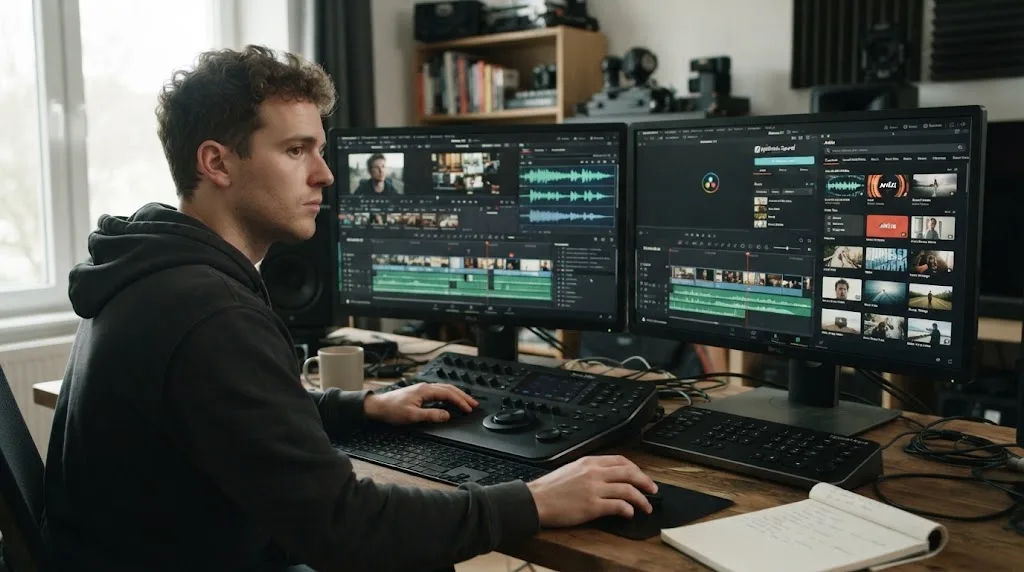
If you are choosing music for a Resolve 21 timeline, the important question isn't which library has the prettier homepage. It's where the asset enters your edit, what the license covers, and what happens when the subscription ends.
We built and run a 100,000+ member professional video-editing community. After 7+ years of professional, commercial video editing, we've seen this decision go wrong for a simple reason: editors compare catalogs and forget the delivery plan. This comparison keeps the edit, the license, and the client in the same frame. As of August 2026, the current reference point is DaVinci Resolve 21.0.4.
Why is Epidemic Sound or Artlist better for DaVinci Resolve 21?
Epidemic Sound wins for a Resolve Studio editor who mainly needs music, sound effects, stems, and licensing in a repeatable soundtracking workflow. Artlist wins when the same purchase should also cover stock footage, templates, LUTs, plugins, and AI-assisted creation. That is the short answer. The rest depends on your plan and delivery use.
Epidemic Sound is the stronger DaVinci Resolve choice when soundtracking is the center of the job.
The practical distinction is not that one service has music and the other does not. Both do. The distinction is that Epidemic Sound documents a dedicated DaVinci Resolve Studio plugin with search, stems, project-local downloads, and drag-and-drop placement, while Artlist's broader value is its combination of audio, visual assets, templates, LUTs, plugins, and AI products. Epidemic Sound's plugin is available on all of its plans, but the Resolve integration itself requires paid Studio. Epidemic Sound documents the plugin requirement and workflow here, and Artlist describes its broader plan mix here.
This is a buying-intent comparison, so here is the disclosure before the recommendation: some Epidemic Sound links in this post may be referral links. If you buy through the Epidemic Sound plan link, the publisher may earn a commission. That referral relationship does not decide the verdict, and the official licensing pages remain the evidence.
How do I compare Epidemic Sound and Artlist in DaVinci Resolve 21?
Epidemic Sound and Artlist are subscription services, not DaVinci Resolve effects or audio mixers. They supply licensed assets and workflow tools that you bring into Resolve, then Resolve handles the edit, mix, color, effects, and delivery.
DaVinci Resolve 21 itself is a separate application available in free and Studio editions. Blackmagic's current support listing identifies the 21.0.4 update for both editions, and Blackmagic's Resolve 21 materials cover Mac, Windows, and Linux support. Blackmagic's support center lists the current 21.0.4 update. The official Resolve 21 page describes the application and its operating systems.
That separation matters. A subscription can make finding and licensing an audio file easier, but it won't fix a missing Fairlight bus, a wrong timeline sample rate, an offline media path, or a render preset that doesn't match the destination. For the Resolve side of the decision, our DaVinci Resolve 21 review covers the application's version changes separately from the asset libraries.
What does “for DaVinci Resolve” mean in this comparison?
“For DaVinci Resolve” means the service must fit a real Resolve workflow, not merely offer a downloadable WAV file. I am checking four points: how you search, how you move the asset into the project, whether Resolve Free or Studio is required, and whether the license survives the delivery situation you actually have.
The two services fit Resolve in different ways:
- Epidemic Sound has a named DaVinci Resolve Studio plugin. Its Help Center says to install Epidemic Sound Hub, install the plugin, then open it from Workspace > Workflow Integrations. It also says files can be dragged directly to the timeline and that stems can be opened from a track's three-dot menu. Those instructions are in Epidemic Sound's plugin documentation.
- Artlist documents its video-editing plugins as compatible with DaVinci Resolve on Mac and Windows, and its templates as compatible with DaVinci Resolve 18 or newer. Artlist also warns that the Apple Store version of DaVinci Resolve is not compatible with its plugins. Artlist lists the supported hosts and the Mac App Store limitation. Artlist's template documentation lists Resolve 18 or newer.
- Neither service changes the Resolve edit page into a licensing system. You still need to know which account, project, channel, client, and publication the license covers.
Which service fits your DaVinci Resolve 21 workflow?
Epidemic Sound fits an editor who starts with a cut and needs to solve sound inside that cut. Artlist fits an editor or small team building a wider asset stack around the cut. Use the row that resembles your next twelve months of work, not the row that sounds most impressive.
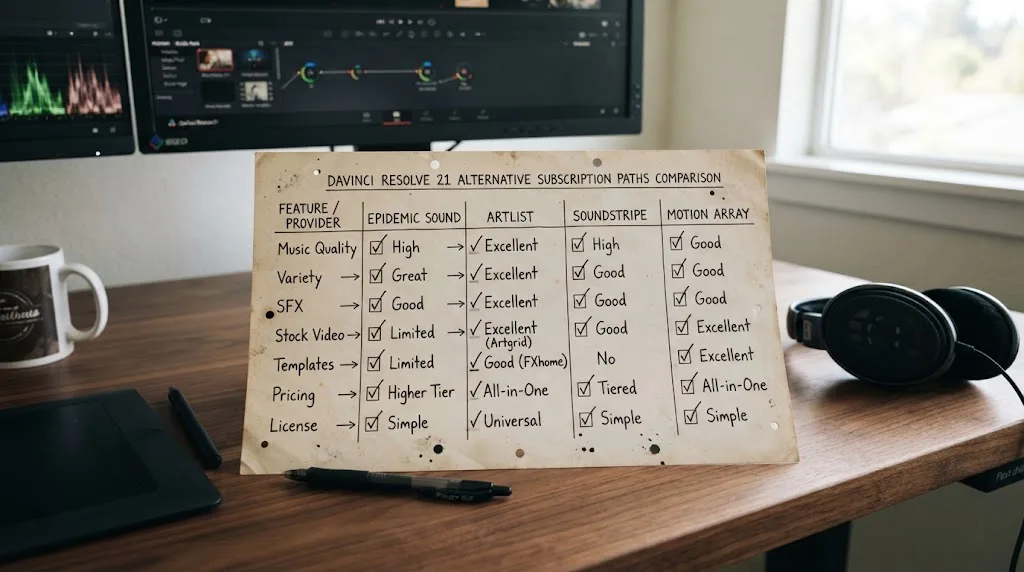
| Decision point | Epidemic Sound | Artlist | Practical choice |
|---|---|---|---|
| Main strength | Music, sound effects, stems, licensing, and soundtracking tools | Music, SFX, footage, templates, LUTs, plugins, and AI tools | Choose Epidemic Sound for audio depth. Choose Artlist for a mixed asset library. |
| Resolve connection | Dedicated DaVinci Resolve Studio plugin with search, stems, downloads, and drag-and-drop | DaVinci Resolve-compatible video-editing plugins and Resolve templates; the documented library extension is for Premiere Pro | Choose Epidemic Sound when in-Resolve sound search is central. Choose Artlist when downloads and templates are acceptable. |
| Free Resolve | The plugin requires paid Resolve Studio | Artlist says its plugins do not work with the Apple Store version, and its plugin documentation does not turn Resolve Free into Studio | If you use Resolve Free, plan on a browser or desktop download workflow and check each product's requirements. |
| Music and SFX | Music-first service with sound effects, stems, track adaptations, voiceover tools, and soundtrack drafting | Music and SFX are part of a wider stock and AI offering; Max adds the broader catalog and tools | Choose based on whether audio or total asset coverage is the recurring bottleneck. |
| Stems | Epidemic Sound documents stem access in its Resolve plugin | Artlist documents unlimited access to available stems on Max plans | Both can support stem-based mixing, but plan inclusion differs. |
| Footage and templates | Not the core catalog promise in the sources used for this comparison | Artlist documents footage, templates, LUTs, and plugins in its broader plans | Choose Artlist if you repeatedly need visual assets as well as audio. |
| Client and commercial work | Commercial rights depend on the selected Epidemic Sound plan, with Pro and higher tiers positioned for commercial use | Artlist's Music & SFX Pro and Pro license are positioned for client and commercial work | Do not choose from the service name. Choose from the written license for the project. |
| Channel clearance | Epidemic Sound requires safelisting and publishes plan-specific channel limits | Artlist requires an active plan for publishing and uses clearlisting in its license workflow | Make a channel and project checklist before subscribing. |
| After cancellation | Correctly published, safelisted content remains cleared; new posts after expiry are not covered | Artlist says an active plan is required to publish, and coverage ends for new or published projects after expiry | Epidemic Sound is easier for an archive of correctly cleared past releases. Neither gives you a free pass for new work after expiry. |
| Best alternative | Soundstripe or a single-track license can fit a less frequent audio buyer | Motion Array can fit a template and motion-graphics-heavy editor | Recheck alternatives if your need is occasional or template-led. |
The table has one important limitation: plan names and inclusions change. It is a workflow map, not a substitute for the license you accept at checkout. The current pages should be the final authority for price, plan, channel allowance, commercial use, and AI credits.
Artlist is the better buy when footage, templates, LUTs, and plugins matter as much as music.
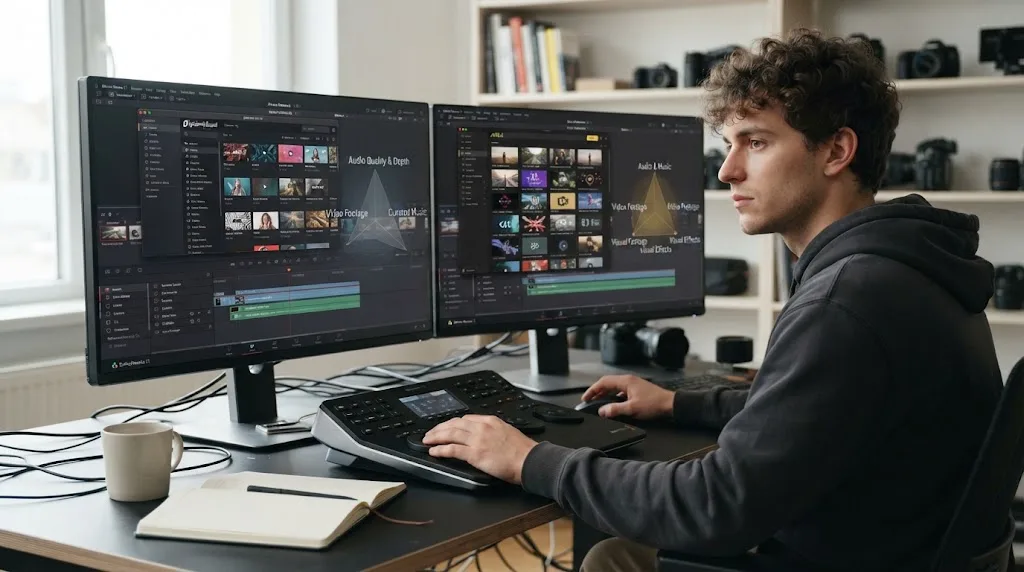
Why does Epidemic Sound have the clearer Resolve Studio integration?
Epidemic Sound has the clearer Resolve-specific integration because its documentation names a DaVinci Resolve Studio plugin, its menu location, its drag-and-drop behavior, and its stem workflow. Artlist also documents Resolve-compatible plugins and templates, but its catalog extension documentation centers on Premiere Pro rather than the same Resolve soundtracking flow.
Epidemic Sound's documented setup is concrete:
- Install DaVinci Resolve Studio from Blackmagic Design's download route.
- Install Epidemic Sound Hub for macOS or Windows.
- Install the DaVinci Resolve Studio plugin from the Hub.
- Open a Resolve project and choose Workspace > Workflow Integrations > Epidemic Sound.
- Sign in inside the plugin when you need to download a track.
- Search, preview, choose a track or stem, and drag it to the timeline.
Epidemic Sound says the plugin is available on all plans, but the plugin requires paid DaVinci Resolve Studio. The vendor also says the free version does not support plugins. This is a product requirement, not an inference from a missing menu. Read the requirement in the Epidemic Sound Help Center.
Resolve 21 adds new Fairlight folder tracks and audio workflow improvements, but those are Blackmagic features, not Epidemic Sound or Artlist features. Blackmagic's Resolve 21 New Features Guide explains that two or more selected tracks can be added to a new folder track from the Fairlight page. That makes a sound library more useful when you have enough effects, dialogue, music, and stems to organize, but it doesn't change the licensing decision. The Resolve 21 guide covers Fairlight folder tracks.
Epidemic Sound's newer Studio workflow also deserves careful wording. Its tutorial says Studio can create a soundtrack draft from a selected video section of up to 4 minutes, using music and sound effects, and that the plugin supports the Studio flow. That is a vendor-described capability. It is not a promise that every draft will match your edit, and I am not presenting a test result for search quality or synchronization quality. The official Studio tutorial specifies the 4-minute selection limit.
What does Artlist actually add to a Resolve workflow?
Artlist adds breadth. Its current plan documentation describes music, sound effects, footage, templates, LUTs, plugins, AI voiceover, AI images, AI video, AI music, and Artlist Studio in the Max offering. The Artlist Max page also lists footage up to 8K and professional formats such as ProRes and DNxHR, subject to the plan and asset. Artlist's Max documentation lists these included categories.
For a Resolve editor, that breadth changes the buying math in three ways.
First, a single account can cover a music bed, a whoosh, a background clip, a title template, and a LUT. That can be convenient for social packages, explainers, ads, and creator channels that need visual assets every week.
Second, the breadth can be waste if you already own a footage library, don't use templates, or prefer to build titles and effects yourself. Paying for unused categories is not a saving just because the feature list is long.
Third, Artlist's Resolve support is not identical across every product. Its plugin article lists DaVinci Resolve among supported desktop hosts and says the plugins appear under OpenFX > Filters. Its template article says Resolve templates are supplied as .dra project files and compatible with Resolve 18 or newer. Artlist separately describes its library extension as a Premiere Pro tool on its tools page. Treat each asset type as its own compatibility check. Read Artlist's plugin documentation. Read Artlist's template documentation. Read Artlist's tools page.
The best Resolve-specific question is not “Which catalog is bigger?” It is “Which parts of my next project can I actually place and clear under the plan I am buying?”
How do you search for music and sound effects inside DaVinci Resolve 21?
Epidemic Sound is the stronger documented choice for searching and placing sound without leaving Resolve Studio. Artlist can still work well when you browse in its service, download the licensed asset, and use its Resolve-compatible templates or plugins, but the documented product emphasis is broader than a Resolve-native soundtracking panel.
Epidemic Sound says its Resolve plugin supports searches by description, reference track, Spotify link, and video context. Its plugin page also describes track adaptations, voiceovers, and drag-and-drop placement. Those methods map to three common editing moments:
- You know the emotion but not the track. Search for the mood, pacing, or scene.
- You know the reference. Search by the track, artist, or Spotify link to find a related feel.
- You have a rough cut but no brief. Use the video context or Studio flow to generate a first soundtrack direction.
The search method can reduce tab switching. It cannot decide whether a client may use the result in a paid ad, whether a channel is correctly safelisted, or whether a track's terms fit a broadcast, app, game, event, or internal use. Those are license questions.
Artlist's advantage shows up when the search problem includes pictures. Its broader plans put music and SFX beside footage, templates, LUTs, plugins, and AI products. If the project brief says “find a bed, three cutaways, a title animation, a grade starting point, and a voiceover,” Artlist can reduce the number of separate vendors you manage. That is a breadth advantage, not evidence that its music search is better or worse. We have not run a controlled search test between the two services.
Why do stems matter in a Resolve mix?
Stems matter because a music file can contain parts you need to balance separately, such as drums, bass, instruments, or vocals. Separate parts give you more control over dialogue, transitions, and the final loudness target than a single stereo file, provided the service includes those stems and the license covers the project.
Epidemic Sound documents stem access in its Resolve plugin: like a track, a liked item can expose a “Show Stems” option, after which individual stems can be viewed and downloaded. Artlist's Max documentation says its Max plans include unlimited access to preview and download available stems. The two claims are not identical. Epidemic Sound documents the Resolve interaction, while Artlist documents stem availability in a plan. Epidemic Sound explains its stem workflow. Artlist explains stem access in Max.
A practical Resolve arrangement is simple:
- Put the full music mix on its own music track while you edit.
- Replace it with stems only after the picture and dialogue timing are stable.
- Route music stems to a Fairlight bus so the group can be automated together.
- Lower or mute the stem that competes with speech instead of crushing the entire track.
- Keep the original full mix disabled but available until delivery is approved.
Resolve 21's Fairlight folder tracks can help keep a project readable when music stems sit beside sound effects and dialogue. If the mix itself is the part slowing you down, our Fairlight mixing guide for DaVinci Resolve goes deeper into the Resolve side.
Does Timeline Sync work in the Epidemic Sound DaVinci plugin?
No. Epidemic Sound's Help Center explicitly says Timeline Sync is not available in its DaVinci Resolve Studio plugin. The plugin supports drag-and-drop, but that is not the same thing as automatic timeline synchronization. Epidemic Sound documents the limitation.
That distinction changes how you should use the tool. Search and download during the rough cut, then place and trim the result in Resolve. Treat Studio's soundtrack draft as an initial arrangement when you choose to use it, then inspect every edit point, music change, and effect. Do not build a delivery promise around automatic sync that the plugin does not provide.
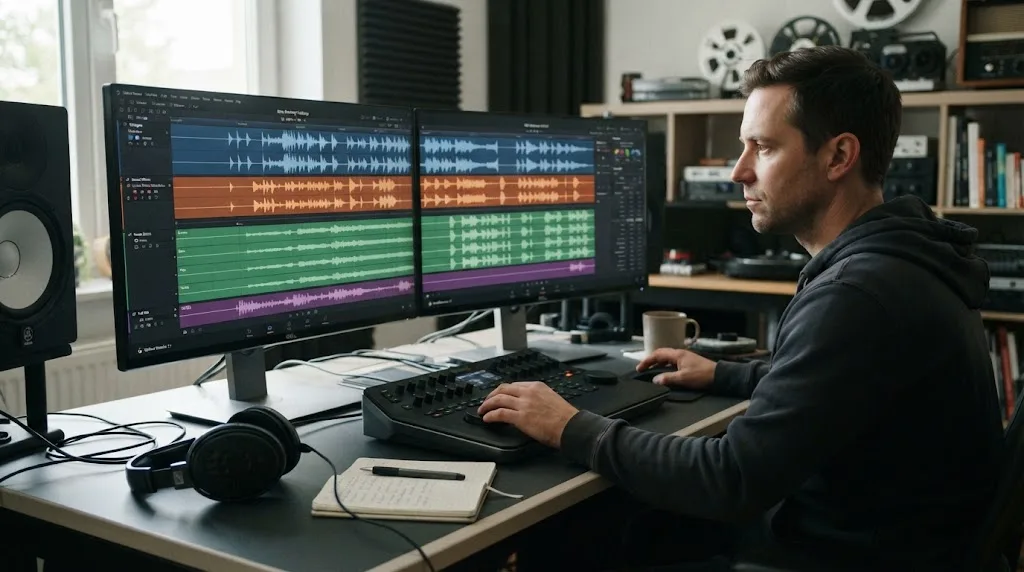
Which service has the better music and sound-effects workflow?
Epidemic Sound has the more focused workflow for recurring soundtracking. Artlist has the more useful workflow when sound is one part of a larger asset hunt. The right choice depends on whether your edit begins with a sonic problem or a production checklist.
When does Epidemic Sound make more sense?
Epidemic Sound makes more sense when you publish often, reuse a known post-production process, and want music, effects, stems, and licensing managed together. Its catalog and tools are positioned around soundtracking rather than around every kind of visual asset.
The service documents unlimited music and sound-effects downloads within the applicable subscription terms. That does not mean unrestricted use, resale, standalone music distribution, or rights for every kind of client and platform. It means the download model is not charged per audio file in the normal subscription flow, while the license still controls use. Epidemic Sound's pricing page describes unlimited downloads and plan-specific rights.
Epidemic Sound also documents direct licensing. Its plan explanation says that when you subscribe and use music on safelisted channels, you deal with Epidemic Sound rather than third-party rights holders. That can make a recurring channel workflow easier to administer, but it does not remove the need to safelist correctly or select the correct plan. Read Epidemic Sound's plan explanation.
The useful question for a Resolve editor is how many times the same friction appears. If you cut weekly videos and repeatedly need a music bed, a transition effect, a few room tones, and stems, the plugin and one licensing account can be a sensible workflow. If you cut one film every two years, a subscription may be harder to justify than a single-track license or another occasional-use option.
When does Artlist make more sense?
Artlist makes more sense when your recurring projects need audio plus visual ingredients. Artlist's own plan documentation separates Music & SFX from broader Max offerings, and it says Max adds SFX, footage, templates, LUTs, plugins, AI-generated voiceover, images, video, music, and Artlist Studio. Artlist lists the upgrade path and categories.
That can fit a social editor who builds a package rather than a single video. You might need a title template for an opening, a lower third, a stock clip for a missing cutaway, a LUT for a starting look, music under the narration, and sound effects for the transitions. Artlist's breadth is meaningful in that case because each category is part of the same account and plan family.
But breadth adds compatibility checks. A template may require a specific Resolve version, fonts, or media. Artlist's template guidance says the downloaded package can include a font folder, help material, and a project folder containing a .dra file. If the template looks broken, the missing font is one documented cause. Artlist explains the template package and font issue.
That is a good example of why the broader catalog is not automatically simpler. It can reduce vendor count while increasing asset-management work inside the project.
How do the licenses differ for YouTube, social video, and client work?
The license is the deciding factor for publication, not the phrase “royalty-free.” Epidemic Sound uses plan-specific coverage and safelisting, while Artlist requires the applicable plan, an active subscription for publishing, and the correct clearlisting workflow. Read the license against your real client, platform, and delivery situation.
What does Epidemic Sound safelisting change?
Epidemic Sound safelisting connects a channel or video to the Epidemic Sound account so platforms can recognize that the music is licensed. Epidemic Sound says you need an active subscription to safelist channels and content, and that correctly published content remains cleared after cancellation. Its Safelisting Help Center explains the process.
For a personal YouTube channel, the checklist looks like this:
- Confirm the account owns or controls the channel.
- Confirm the plan allows that channel and platform.
- Safelist the channel before publishing.
- Keep the project name, asset title, and license records with the Resolve project archive.
- If a claim arrives, use the service's dispute or clearance process instead of assuming the claim proves the track was unlicensed.
Epidemic Sound's current pricing page lists different channel allowances by plan. The page currently shows Creator with one channel per platform and Pro with three channels per platform, while higher plans have different coverage. Those figures can change by region or plan revision, so verify the live page before purchase. Check the current plan comparison.
The most important post-cancellation distinction is this: a video already published and correctly cleared under the active subscription can remain covered, but a new video published after the subscription expires is not automatically covered. Downloading a file before cancellation does not create a permanent right to publish new work after expiry. Epidemic Sound states both points in its safelisting guidance.
What does Artlist clearlisting change?
Artlist's current cancellation guidance says an active plan is required to publish projects using Artlist assets, and that once a plan expires, the license no longer covers downloaded stock assets in new or published projects after the expiry. Artlist also distinguishes the subscription's current access from the right to publish a project. Read Artlist's cancellation guidance.
That wording means you should not leave an Artlist project half-finished, cancel, then publish from an old download and assume the old download is enough. Clear or register the project while the plan is active as required by the license, and keep the project record with the media.
Artlist's plan documentation says its Music & SFX Pro plan adds a Pro license suitable for client and commercial work. It also lists separate social, Pro, teams, Max, Business, and Enterprise paths. A personal social plan and a client commercial plan are not interchangeable because they solve different publication problems. Artlist explains the plan upgrades.
Can either service guarantee zero copyright claims?
Neither service should be treated as a promise of zero claims. Epidemic Sound explicitly makes safelisting part of the process, and its guidance explains that a claim can still require resolution. Artlist's process also depends on the correct plan, project, and license state.
The cleanest way to reduce risk is to make licensing part of the Resolve handoff:
- Save the service name and account email in the project notes.
- Save the asset title, artist or creator, and download date.
- Save the plan name and the client or channel covered.
- Record the publication date and platform.
- Safelist or clearlist before delivery, not after a claim arrives.
- Keep the original asset and license record when you archive the project.
This isn't bureaucracy for its own sake. It answers the question a client will ask six months later: “Why is this track in the video, and what proves we can keep the video online?”
A downloaded track is not the same thing as a permanently cleared future publication.
Which license fits a freelance editor?
A freelance editor needs a plan that covers the editor's role, the client's project, and the publication channel. Epidemic Sound's public plan pages position Pro for professionals and freelancers creating commercial online video, while Artlist positions its Pro license for client and commercial work. Those are useful starting points, not permission to skip the license text.
Ask these questions before choosing:
- Is the finished video published on your channel, the client's channel, or both?
- Is it organic content, a paid digital ad, or both?
- Does the client need perpetual coverage for an already published video?
- Will a team member or agency need access to the account?
- Are there more channels than the plan permits?
- Will the music be used in a film festival, broadcast, app, game, public event, or internal company presentation?
- Will the client need to reuse the music in a new edit after your subscription ends?
Epidemic Sound's licensing options page distinguishes Creator, Pro, Business, Enterprise, and single-track licensing. Artlist's current plan pages likewise distinguish social, Pro, teams, Max, Business, and Enterprise coverage. If the answer involves a client, ad spend, an organization, or a new publication after cancellation, read the commercial terms before downloading. Epidemic Sound lists its licensing routes here. Artlist lists its current plan structure here.
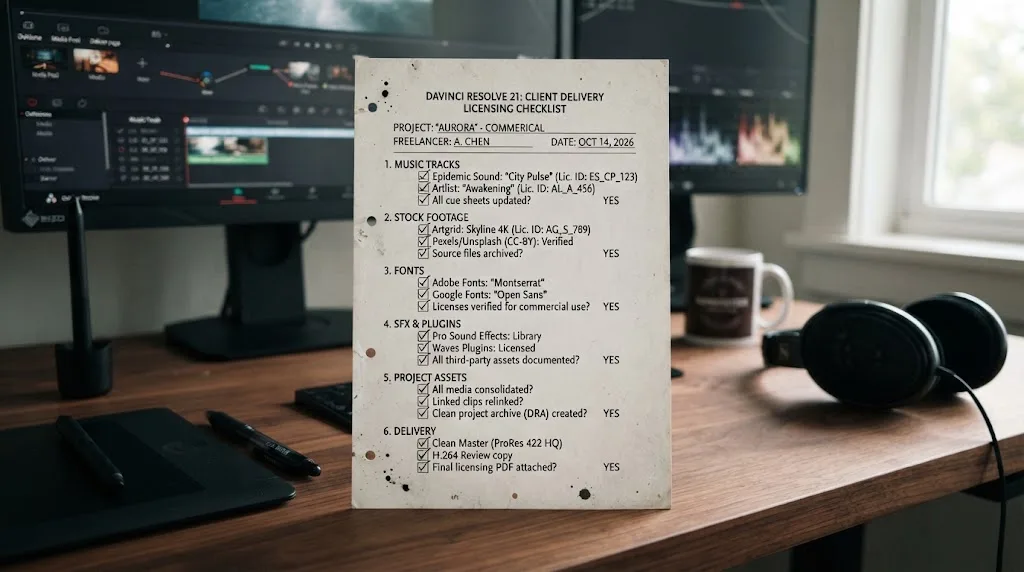
What happens to your Resolve projects after you cancel?
Epidemic Sound is more forgiving for correctly published and safelisted past content, while Artlist's current guidance is stricter about an active plan for publishing and coverage after expiry. Neither service lets you treat a downloaded file as a perpetual license for new projects.
What happens after canceling Epidemic Sound?
Epidemic Sound says content published during a free trial or active subscription remains cleared after cancellation when the channel was correctly safelisted under the terms. It also says you cannot publish new content with Epidemic Sound music after the subscription expires unless you reactivate or otherwise obtain the appropriate license. Its plan page states the cancellation rule.
That creates a sensible archive workflow:
- Finish and publish the approved video while the subscription is active.
- Confirm the channel is safelisted.
- Export a license record with the final Resolve project.
- Store the project archive with the rendered master and the asset metadata.
- If the client wants a new cut after expiry, check whether the new publication is a new use that needs an active plan.
Do not generalize “past content remains cleared” into “every old download remains available for every new use.” The wording is about correctly published content, not an unlimited future-use guarantee.
What happens after canceling Artlist?
Artlist says the subscription continues until the end of the current billing cycle after cancellation, but once the plan expires the license no longer covers use of downloaded stock assets in new or published projects. Its guidance also says an active plan is required to publish projects using Artlist assets. Read the current refund and cancellation policy.
The operational difference is easy to miss. Canceling renewal is not the same as losing access immediately. You can still work during the paid period, but you should complete the clearing and publication steps before expiry if the license requires them. If a client delays approval beyond that date, pause and confirm coverage before publishing.
Which service is safer for a long-lived YouTube library?
For a long-lived YouTube library, correctly safelisted Epidemic Sound publications have the clearer public post-cancellation statement. Artlist can still fit long-lived work, but you must follow its active-plan and project-clearance requirements before the plan expires. The safer choice is the one whose workflow your team will document consistently.
This is not a claim that one service is universally safer. The risk is usually procedural. An editor can create a problem with either service by using the wrong plan, failing to clear a channel, publishing after expiry, or handing a client a file with no license record.
How much do Epidemic Sound and Artlist cost for a Resolve editor?
Epidemic Sound currently offers a lower-entry audio subscription structure, while Artlist's value increases when you actually use its broader asset categories. Compare the total cost against the number of asset types you need, the license you need, and the months in which you will publish.
Epidemic Sound's public US pricing page currently shows Creator at $9.99 per month billed yearly, Pro at $16.99 per month billed yearly, and Business at $30 per month billed yearly. The same page says yearly billing is discounted, and its displayed plan details include unlimited music and sound-effects downloads with plan-specific channel and commercial rights. Prices, taxes, currency, and plan presentation can vary, so treat those figures as an August 2026 US snapshot, not a permanent quote. Verify current Epidemic Sound pricing before checkout.
Artlist's current pricing page presents separate AI, Music & SFX, Footage & Templates, Max, Business, and Enterprise paths. Its plan guidance says you can choose Music & SFX when you need sound, Footage & Templates when you need visual assets, and Max when you want the full stock catalog plus AI tools. It does not make sense to compare an Epidemic Sound audio plan against Artlist Max solely on the sticker price because the products cover different baskets. Artlist's current plan selector explains the categories.
Should you pay for one broad plan or two focused tools?
Pay for one broad plan when you use several included categories every month and the license covers the work. Pay for a focused audio plan when music and SFX are the recurring need and you already have footage, templates, LUTs, and plugins handled elsewhere.
Use this monthly audit before you buy:
| Last three projects needed | Likely direction |
|---|---|
| Music beds, dialogue support, whooshes, impacts, stems | Epidemic Sound or another audio-first service |
| Music, SFX, footage, templates, LUTs, and plugins | Artlist Max or a similar broad asset plan |
| One song for one finished film | Single-track licensing may be more rational than an always-on subscription |
| Multiple client channels and paid advertising | Compare commercial or business plans, not social creator plans |
| A Resolve Free workflow | Ignore plugin convenience and compare download, license, and delivery steps |
| A team with shared projects | Check seats, account access, client coverage, and enterprise terms |
The test is simple: list the last three projects, circle the asset categories you used, and count the categories you expect to use next. If the answer is music in all three projects and footage in none, Artlist's breadth is not automatically an advantage. If the answer includes five visual and audio categories every week, Epidemic Sound's focus may leave you opening more services.
Is a free trial enough to decide?
A free trial can test account setup, search habits, and project organization, but it cannot answer a license question unless you read the trial terms. Epidemic Sound publicly describes a free trial on its pricing page and says content published during a free trial can remain cleared when correctly safelisted. Artlist's cancellation guidance says a free trial account remains free indefinitely unless you subscribe, but trial usage and license terms still need checking. Epidemic Sound lists its trial and plan terms. Artlist explains its trial and cancellation behavior.
Use a trial to answer practical questions:
- Can you find a usable track in the time your edit allows?
- Does the plugin appear in your Resolve build?
- Can you sign in and download without confusing the account?
- Are the stems available for the track you selected?
- Can you record the license and safelist the correct channel?
- Does the service's plan language match the actual project?
Do not use a trial to publish a client campaign casually. Treat the trial as a controlled test with a project whose rights and publication path you understand.
Why doesn't Epidemic Sound work with the free version of DaVinci Resolve?
No, the Epidemic Sound DaVinci plugin requires paid DaVinci Resolve Studio. The free version of DaVinci Resolve does not support the plugin, according to Epidemic Sound's Help Center.
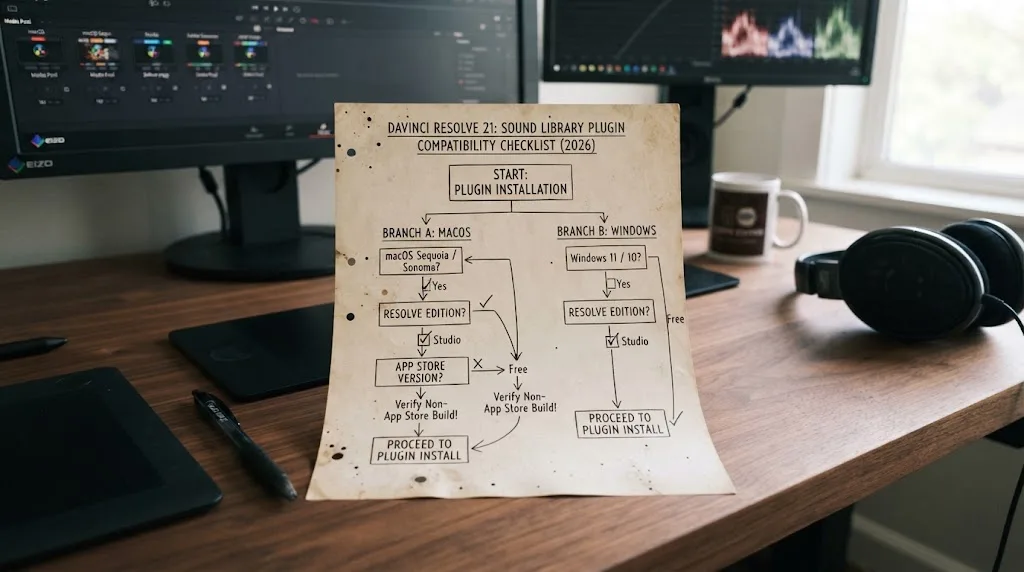
This is the first branch to check because it can change the whole comparison. If you use Resolve Free, the in-editor advantage disappears for Epidemic Sound. You can still download files through the service's supported web or desktop workflow, import them into Resolve, and manage the edit yourself, but you should not expect the Workflow Integrations menu.
The same caution applies to the Apple App Store edition of Resolve Studio. Epidemic Sound says the plugin is unavailable in that build because the needed Workflow Integrations option is not available. Artlist also says its plugins are not compatible with the Apple Store version of DaVinci Resolve. If you are on a Mac, check where Resolve Studio came from before choosing based on plugin convenience. Epidemic Sound documents its limitation. Artlist documents its limitation.
What should you do if Workflow Integrations is missing?
If Workflow Integrations is missing in Resolve 21, first confirm that the installed application is paid DaVinci Resolve Studio from Blackmagic Design rather than Resolve Free or the Apple App Store build. Then close Resolve, update the service's Hub or plugin, reopen a project, and look again.
Use this branch:
- Check the application name in Resolve's About window.
- Check whether the installed build came from Blackmagic Design or the Mac App Store.
- If it is Resolve Free, install Studio only if you need the plugin and its paid features.
- If it is the Mac App Store build, install the compatible Blackmagic Design build according to Blackmagic's licensing terms.
- Close Resolve before installing or reinstalling the plugin.
- Keep Epidemic Sound Hub installed if you want automatic plugin updates.
- Reopen Resolve and look under Workspace > Workflow Integrations.
Epidemic Sound's Help Center specifically tells users to close Resolve before installation and says the Hub should remain on the computer for automatic updates when Resolve restarts. Those are vendor instructions, not a claim that every setup issue has the same cause. Follow the official installation steps.
Does Resolve 21.0.4 change the plugin decision?
Resolve 21.0.4 does not turn Resolve Free into Studio and does not add Timeline Sync to the Epidemic Sound plugin. The plugin requirement remains a service and host-build issue, while Resolve 21.0.4 is a Blackmagic software update with its own fixes.
Blackmagic's support page currently lists Resolve 21.0.4 for Mac, Linux, Windows x86, and Windows ARM. The page also identifies update-specific improvements, including relinking proxy clips with different formats, additional X-OCN formats, an API scripting option for reviewing selected timeline clips, and improved real-time playback on timelines with a large cache. Those changes may affect your general Resolve workflow, but they are not sound-library features. Check Blackmagic's current support notes.
How should you use Epidemic Sound in a real Resolve project?
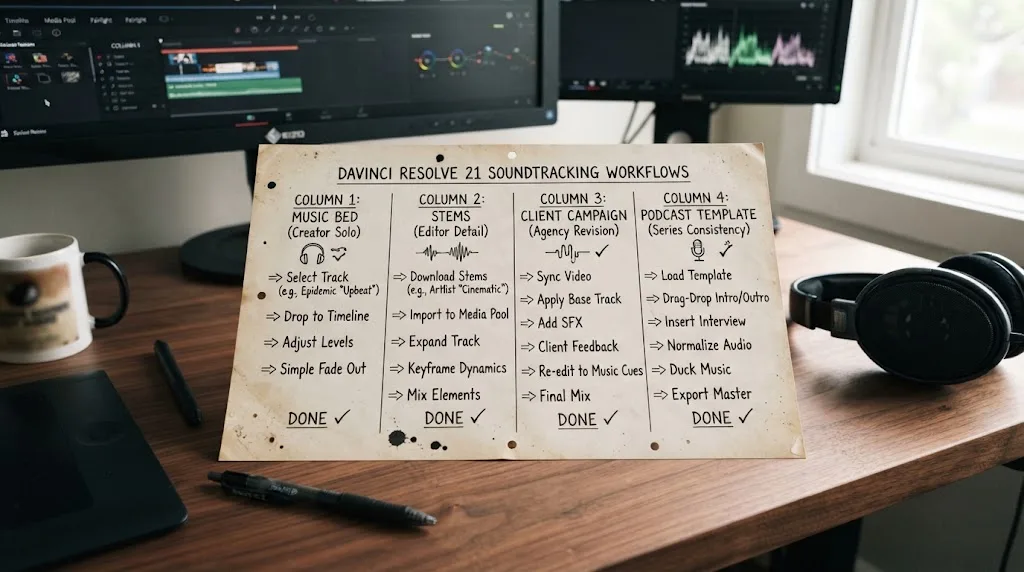
Use Epidemic Sound as a soundtracking layer around the edit: cut the picture, search for a direction, place a temporary bed, refine with stems or adaptations, then document the license before delivery. The plugin can shorten the distance between search and timeline, but Resolve still owns the edit and mix.
Workflow 1: YouTube essay or tutorial
For a YouTube essay, start with the narration and picture. Add a temporary music bed at a low level, then use the plugin to search for a track by mood or reference. When the structure is stable, replace the temporary bed with the chosen track, add selected sound effects, and use stems if the music competes with speech.
The license path is usually personal-channel coverage, but the plan still matters. Epidemic Sound's public pricing page currently lists Creator as intended for personal video content and Pro as adding digital ads and freelance client-work protection. If the video is sponsored or the channel belongs to a business, do not assume Creator is sufficient. Compare the displayed plan rights.
In Resolve 21, keep your music and effects in a Fairlight folder arrangement that matches the project. A simple structure can be Music, Music Stems, Sound Effects, Voiceover, and Printmaster. Resolve 21's new Fairlight folder tracks are a Blackmagic feature that can make this arrangement easier to navigate. Blackmagic describes the new folder-track behavior.
Workflow 2: Freelance client social campaign
For a client social campaign, begin with the deliverables and publication owners, not the track search. Write down the client, channels, whether the videos are paid ads, the number of variations, and who will publish them. Then choose the Epidemic Sound plan whose license matches that list.
Epidemic Sound's public page currently positions Pro for professionals and freelancers creating commercial video online, with digital ad and client-work coverage shown in its comparison. Business adds a different set of organization and client features. Check the live terms if the campaign includes a brand account, multiple publishers, or a platform not listed in the plan. The official plan comparison is the current reference.
Inside Resolve, build one master timeline and duplicate versions for each aspect ratio or platform. Keep a text note in the project with the selected track, plan, channel, and publication date. If the client replaces the music after approval, update the record. Licensing is part of the deliverable.
Workflow 3: Rough cut that needs a soundtrack direction
For a rough cut that has no soundtrack direction, Epidemic Sound's Studio feature can create an initial soundtrack draft from a selected video section up to 4 minutes, according to its tutorial. Use that result as an editorial prompt: observe where music changes, where effects might help, and where the cut feels empty.
Then make human editorial decisions. Keep useful choices, remove anything that fights dialogue, and replace a generic cue when the story needs a more specific point of view. The vendor describes the feature and the input limit; we have not independently tested its recommendations or claimed a quality score. Read the Studio workflow.
Workflow 4: Podcast video with recurring episodes
For a podcast video, consistency matters more than novelty. Create a Resolve template with dialogue, music, room tone, intro, outro, and effect tracks. Choose a service that lets you keep a clear record of the recurring music and the channel or client coverage.
Epidemic Sound can fit when the recurring need is audio and the editor benefits from its Resolve Studio plugin. Artlist can fit when each episode also needs stock cutaways, templates, or LUTs. If your podcast grows into multiple shows or client accounts, review channel and team coverage before the current plan becomes a hidden bottleneck.
Our guide to DaVinci Resolve export settings is useful at this stage because the right library does not fix a delivery preset. The Resolve project still needs a deliberate video and audio export path.
How should you use Artlist in a real Resolve project?
Use Artlist as a broader production-asset account: define the visual and audio ingredients, download the compatible asset type, install only the plugins or templates your Resolve build supports, and clear the project while the plan is active. The benefit is breadth, not a guarantee that every asset behaves like a Resolve-native sound panel.
Workflow 1: Social package with footage and templates
For a social package, Artlist can be a strong fit when the brief needs music, SFX, footage, templates, and LUTs in the same production cycle. The current Max documentation names those categories and also lists AI tools, but each category can have its own plan rules, asset limits, and workflow requirements.
Start with a bin structure that separates downloaded assets from camera media. Keep the original archive and the downloaded service asset together, then copy the relevant .dra template project or Fusion effect into a controlled Resolve project. Check fonts and linked media before you build the edit around the template.
Artlist's template docs say templates are available for DaVinci Resolve and provide a .dra project file in the download. They also say templates are designed for professional desktop software and cannot be edited directly on the Artlist website. Read the template workflow.
Workflow 2: Music-first edit with a browser download
For a music-first edit, Artlist can still work if you don't need the dedicated Epidemic Sound plugin. Browse, download, import into Resolve, and save the license or clearlist record with the project. This is a normal workflow, but it has more handoff points than searching and dragging from the Epidemic Sound Resolve plugin.
The extra handoff is not automatically bad. Some editors prefer to audition in a browser, download a small shortlist, and keep the Resolve UI uncluttered. Others want to search without leaving the timeline. Pick the workflow that your team will repeat accurately.
Workflow 3: Client explainer with a title system
For a client explainer, Artlist's broader asset mix can reduce the need to source a title animation, a few transitions, a LUT, and supporting footage from different vendors. Artlist's plan documentation positions its Pro license for client and commercial work, but the client and campaign still need the right license and clearlisting procedure.
Keep a record of the downloaded asset, the plan, the project, the client, and the publication channel. If the asset is a template, keep the required fonts and any help document with the project archive. If the asset is footage, do not separate the license record from the rendered project.
Workflow 4: Resolve 21 color and visual effects handoff
Resolve 21 adds the Photo page and new image-oriented features in Blackmagic's own application. Artlist can complement that workflow with footage, templates, and LUTs, but an Artlist LUT is not a Resolve 21 color-management plan. Test the LUT in the correct color space, label the node, and keep the original grade available.
Blackmagic's Resolve 21 guide says the Photo page uses the native resolution of photos for the working image and that export uses the original full-sized image. That fact belongs to Resolve, not Artlist. The two products meet only at the handoff where an asset enters the project. Blackmagic documents the Photo page and its export behavior.
Why do templates and LUTs change the Artlist verdict?
Templates and LUTs change the verdict because they can turn Artlist from an audio alternative into a production-bundle alternative. If you use those categories, the broader subscription can replace separate purchases. If you don't, the same categories are mostly unused value.
Artlist's documentation says its Max plan includes templates, LUTs, and plugins, while its Footage & Templates path focuses on visual assets. Its help center also says the daily download allowance for LUTs can be up to 40 on Footage & Templates or Max plans. That is a concrete plan detail, but it can change, so verify the current plan before relying on it. Artlist documents the LUT download detail.
Resolve editors should inspect a template before committing to it:
- Which Resolve version does the template support?
- Does it need Resolve Studio, or only a free Resolve feature set?
- Are the required fonts included or linked externally?
- Does it use Fusion, Edit page titles, OpenFX, or a third-party plugin?
- Does it depend on media that will go offline when the project moves computers?
- Is the template licensed for the client and platform where the final video will run?
- Can you hand the project to another editor without the original service account?
The answers determine whether Artlist's breadth saves time or introduces a cleanup task. A template that needs a missing font or a plugin your client cannot install is not a saving at delivery.
A broad asset subscription earns its keep only when your projects use the breadth.

Which service handles a Resolve team or agency better?
For a team or agency, the better service is the one whose license names the people, channels, clients, and publication uses you actually manage. Artlist offers team and business paths, while Epidemic Sound separates Creator, Pro, Business, and Enterprise options; account structure matters as much as catalog access.
What should a small Resolve team ask Epidemic Sound?
A small Resolve team should ask Epidemic Sound whether the selected plan covers the number of users, client projects, channels, ad campaigns, and internal uses. The public pages describe Creator, Pro, Business, and Enterprise tiers with different audiences and rights.
Do not treat a shared login as a team license. Decide who searches, who downloads, who owns the project, and which account safelists the publication. Keep that decision in the production checklist.
If the team works on a client campaign, check whether the plan protects freelance client work, digital ads, and the channels that publish the finished assets. If the team is a larger organization or needs custom terms, compare the Business and Enterprise routes rather than stretching an individual plan.
What should a small Resolve team ask Artlist?
A small Resolve team should ask Artlist whether the plan supports the required seats and whether the license covers all clients and publications. Artlist's Music & SFX Teams path is described as a multi-seat account for 2 to 7 users, while its Max documentation describes team-member access depending on the Max plan and credit tier. Those numbers are plan-specific and should be checked on the live page.
Artlist's breadth can help an agency standardize music, footage, templates, LUTs, and plugins, but standardization only works when every editor can open the project. Check fonts, template versions, plugin availability, shared storage, and the account workflow before you make the service part of a template.
Which service is better for client handoff?
Epidemic Sound is better for a client handoff when the client needs recurring audio and the editor can document safelisting and publication rights. Artlist is better when the handoff also includes a collection of visual assets, templates, and LUTs. In both cases, the editor should deliver the license record with the master and project archive.
The handoff package should include:
- Final video masters.
- The Resolve project archive or agreed project files.
- A list of music and SFX asset names.
- The service account or client ownership arrangement.
- The plan and relevant license scope.
- Channel or project clearance confirmation.
- Notes about fonts, templates, plugins, and any linked media.
That package protects the edit when the person who downloaded the asset is not the person who publishes the video.
Which alternatives should DaVinci Resolve editors consider?
Epidemic Sound and Artlist are not the only options. Soundstripe may fit occasional or single-track licensing, and Motion Array may fit a template-heavy workflow. The best alternative is determined by how often you publish and what you need besides music.
When is Soundstripe a better fit?
Soundstripe can be a better fit when you want a different mix of music, SFX, stock video, project collaboration, enterprise licensing, or single-use licenses. Its public pricing page describes subscriptions and single-use options, so it deserves consideration when an always-on subscription is not the cleanest match. Review Soundstripe's current pricing and licensing.
Soundstripe is not automatically a better Resolve integration. Compare the exact import, extension, or browser workflow you plan to use. If the value is one track for one film, single-use licensing can be more relevant than a Resolve plugin.
When is Motion Array a better fit?
Motion Array can be a better fit when templates, presets, motion graphics, footage, graphics, photos, LUTs, and editing plugins are more important than a music-first soundtracking workflow. Its pricing page presents that broader mix and team-oriented options. See Motion Array's current plan categories.
Motion Array competes more directly with Artlist's breadth than with Epidemic Sound's focused soundtracking flow. If your Resolve project begins with an animated title, a transition pack, a stock shot, and a LUT, it may be worth comparing those workflows before choosing an audio-first service.
Can you use a single-track license instead?
Yes, a single-track license can be the right answer when you have one project, one track, and a clearly defined publication. Epidemic Sound documents single-track licensing as one of its options, and other services also offer single-use models. The key is to confirm the license covers the final use, not simply that the download is available.
This route can be less convenient for a weekly channel because you repeat the search and paperwork each time. It can be more rational for a short film, a one-off client video, or an edit with a specific song that you do not need to replace later.
Which alternative is best for a Resolve Free user?
For a Resolve Free user, the best alternative is the service with the clearest download and license workflow for the project, because the Epidemic Sound Resolve plugin is unavailable. A browser-based library, a single-track license, or a broader service used outside Resolve can all fit.
Do not pay for plugin convenience you cannot use. First confirm whether you need Studio for other Resolve features anyway. If you do, the plugin requirement may be less of a deciding cost. If you don't, compare the total monthly cost and the manual import steps honestly.
Why should you listen to this comparison?
This comparison is grounded in the public product and licensing documentation, not a claim that we measured catalog quality, search accuracy, plugin speed, or soundtrack-draft quality. We have taught 100,000+ students on Udemy, are an official Udemy Business Partner, and have taught and worked with Fortune 500 companies. That experience makes licensing and handoff problems familiar, but it does not turn a vendor claim into our test result.
We also built and run a 100,000+ member professional video-editing community. One recurring question in that community is whether an asset service will still be useful once the editor has to deliver to a client, a channel, or a paid campaign. That is why this comparison spends more time on license scope and Resolve handoff than on catalog adjectives.
Blackmagic's Grant Petty, CEO of Blackmagic Design, writes in the official Resolve 21 New Features Guide: “With this release, we hope to inspire creativity by letting you work in a comfortable, familiar way.” Read the signed guide from Blackmagic Design. The quote describes Resolve's design goal. It does not endorse either asset service.
TryUncle is the on-screen assistant for DaVinci Resolve on macOS. Ask in plain words and Uncle points at the exact control on your screen.
That tool is outside this comparison's verdict. The query here is a licensing and asset-service decision, not a request for a Resolve tutor or an app that helps you find controls.
Which service should you choose for your next DaVinci Resolve project?
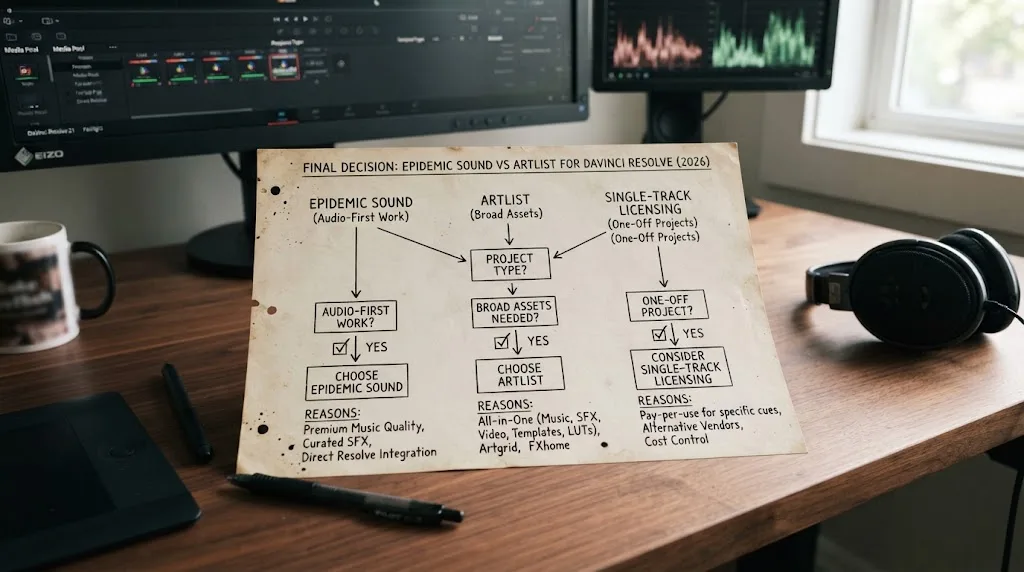
Choose Epidemic Sound if your next project is primarily a soundtracking job and you use paid DaVinci Resolve Studio from a compatible Blackmagic Design installation. Choose Artlist if your next project needs music plus a steady stream of footage, templates, LUTs, plugins, and other visual or AI assets.
Choose Epidemic Sound if...
Choose Epidemic Sound if:
- Music and sound effects are your main recurring asset need.
- You want a documented Resolve Studio plugin with search, stems, downloads, and drag-and-drop.
- You publish often enough to benefit from a subscription model.
- You can safelist the right channels and select the right commercial plan.
- You want a clear public statement that correctly published and safelisted past content remains cleared after cancellation.
- You are comfortable checking the plan again when the use changes from personal video to client work or paid advertising.
Epidemic Sound is the better answer for the narrow version of this query: “I edit in Resolve Studio and need licensed sound without constantly leaving my project.” It is not automatically the better answer for “I need every production asset in one place.”
Choose Artlist if...
Choose Artlist if:
- Footage and templates appear in most of your projects.
- LUTs, plugins, and visual assets matter nearly as much as music.
- You want to evaluate a Max or team plan against several separate asset subscriptions.
- You can manage templates, fonts,
.drafiles, and project clearlisting. - You need a broader account for social packages, explainers, or agency production.
- You accept that the documented Resolve workflows vary by asset type.
Artlist is the better answer for the broader version of this query: “I want audio, stock, templates, LUTs, and plugins around my Resolve work.” It is not automatically the better answer for a music-first editor who will not use those extra categories.
Choose neither subscription if...
Choose neither subscription if:
- You need one song for one finished project.
- You will publish only occasionally and don't need a continuing catalog.
- Your client already supplies licensed music.
- You already own the footage, templates, LUTs, and effects you use.
- Your Resolve edition or operating system makes the plugin workflow unavailable.
- You cannot yet identify who will publish the work and what license they need.
The honest next step is to write your delivery checklist before you click subscribe. Note the Resolve edition, operating system, asset categories, client or channel, platform, ad status, number of users, and expected publication date. Then compare the current official plan pages against that list.
The best subscription is the one whose license matches the finished video, not the one with the longest feature list.
Frequently asked questions
- Why is Epidemic Sound or Artlist better for DaVinci Resolve 21?
- Epidemic Sound is better for a music and sound-effects workflow inside the paid DaVinci Resolve Studio app. Artlist is better when the same subscription also needs footage, templates, LUTs, plugins, and AI tools.
- Why doesn't Epidemic Sound work with the free version of DaVinci Resolve?
- No. Epidemic Sound says its DaVinci Resolve plugin requires DaVinci Resolve Studio, and the free version does not support the plugin. You can still download assets outside Resolve if your plan allows it.
- How do I choose between Epidemic Sound and Artlist for client work?
- Either can cover client work only through the appropriate commercial license. Epidemic Sound positions Pro and higher plans for commercial use, while Artlist says its Pro license covers client and commercial work. Verify the current license before publishing.
- What happens to Epidemic Sound or Artlist projects after cancellation?
- Epidemic Sound says correctly published and safelisted content remains cleared after cancellation, but new publications after expiry are not covered. Artlist requires an active plan for publishing and says downloaded assets are not covered in new or published projects after the plan expires.
- How do I use Artlist with DaVinci Resolve?
- Artlist documents DaVinci Resolve compatibility for its video-editing plugins and templates, while its catalog extension is described for Premiere Pro. Epidemic Sound has a dedicated DaVinci Resolve Studio soundtracking plugin with search and drag-and-drop.
Sources
- DaVinci Resolve 21 New Features Guide
- Blackmagic Design DaVinci Resolve support and current updates
- DaVinci Resolve 21 What's New
- Epidemic Sound DaVinci Resolve Studio plugin Help Center
- Epidemic Sound plugin for DaVinci Resolve Studio
- Epidemic Sound pricing and licensing
- Which Epidemic Sound plan is right for you?
- Epidemic Sound safelisting Help Center
- What are the options when licensing a track? Epidemic Sound
- Epidemic Sound Studio video-to-audio tutorial
- Artlist pricing plans
- Artlist Music and SFX plans explained
- Artlist Max plan explained
- Using Artlist's video editing plugins
- Artlist video editing tools
- Starting with Artlist templates
- Browsing Artlist templates
- Artlist refunds and cancellations
- Downloading Artlist assets
- Motion Array pricing plans
- Soundstripe pricing and licensing
Put this guide to work with TryUncle.
Ask about the step you’re on. TryUncle sees your screen and points at the control you need, so you can keep learning in your own project.
Get TryUncle for Mac or WindowsKeep reading
Reviews · Jul 7, 2026 · 22 min
DaVinci Resolve 21 Review: What's New and Is It Worth Upgrading?
A close look at DaVinci Resolve 21: the new Photo page, IntelliSearch, CineFocus, Krokodove, what Blackmagic actually shipped, and who should upgrade now.
Guides · Jul 11, 2026 · 31 min
How to Mix Audio in DaVinci Resolve Using Fairlight
Mix audio in DaVinci Resolve's Fairlight page: build a dialogue/music/effects bus structure, gain-stage your clips, EQ and compress dialogue, then duck music under it.
Guides · Jul 7, 2026 · 23 min
DaVinci Resolve Export Settings: Numbers That Actually Work
The exact DaVinci Resolve export settings for YouTube, client handoffs, and ProRes archives, plus what changed with Resolve 21's H.265 encoder.